SkyView® Explore the Universe
Terminal Eleven LLCEducation
4.51.35K Reviews
- Version
- 3.9.2
- Installs
- 500.00K
- Age Rating
- Everyone
Screenshots
Our Review of SkyView® Explore the Universe
 Analysis by Appyee
I find SkyView® most convincing when I treat it as a field guide rather than a replacement for learning the night sky. It turns the simple question “What am I looking at?” into an immediate activity: point your phone upward, identify a bright object, then follow your curiosity from there. That makes it especially appealing for casual stargazing, families, and anyone who wants a friendly first step into astronomy. Its augmented-reality view is engaging, though it works best when you have patience for the occasional mismatch between the screen and the real sky.
As an education app from Terminal Eleven LLC, SkyView® Explore the Universe has a clear purpose: make celestial objects easier to recognize without asking you to begin with charts or specialist vocabulary. It costs $4.99, is rated for Everyone, and has a 4.5 average from around 7.8K ratings. Those figures suggest a strong audience response, but the more useful question is whether its style suits the way you like to explore. I think it does if you value quick visual discovery over a dense astronomy reference.
Finding Your Bearings Under the Night Sky
I use SkyView best as a prompt to look more closely, not as a substitute for learning the sky. Its strength is making a first question—what is that bright point?—easy to follow, while the most rewarding step is putting the phone down and trying to recognize the object again for yourself. I’ll look at how that simple workflow helps beginners, and where a paper chart or a more specialized reference may serve better.
A quick way to turn curiosity into observation
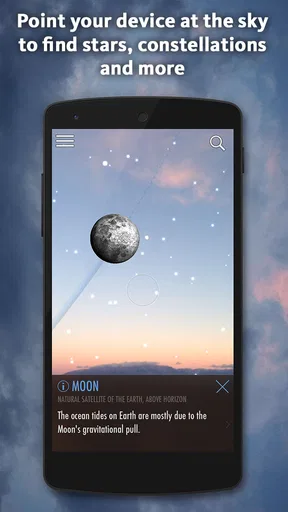
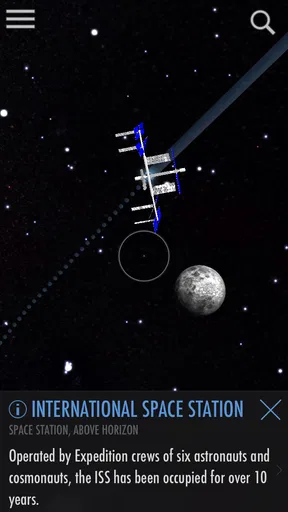
The central appeal is straightforward. You aim your phone at the sky and see labels for stars, planets, and satellites overlaid on the view. Rather than scrolling through a long list and guessing which entry corresponds to a bright point overhead, you can use the direction you are already facing as your starting point. For someone who has never learned the constellations, that change makes the sky feel less like a jumble and more like a place with landmarks.
I would use it in short bursts, not stare at the screen for an entire evening. Find a point of light, check its label, then lower the phone and look at the object directly. That small habit matters: the app is most rewarding when it helps you connect a name to something you can see, rather than becoming the whole stargazing experience. It also gives your eyes a chance to adjust again after looking at a bright display.
Useful features for planning and learning
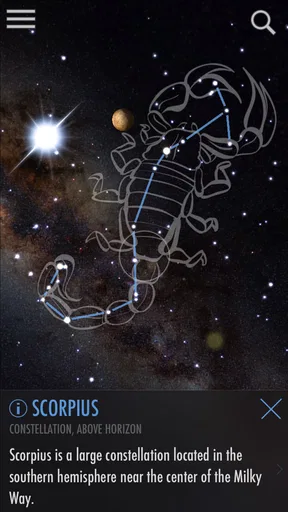
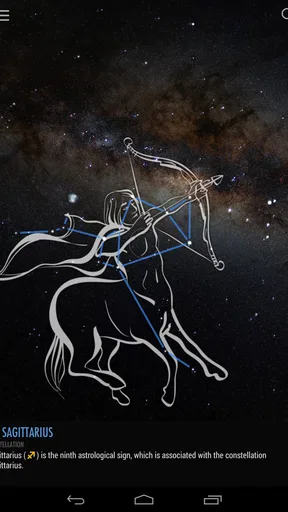
The augmented-reality overlay is the feature that makes the app easy to understand at first glance. Constellations are shown with lines connecting their stars, so the familiar “join the dots” approach has a practical use here. I find that particularly helpful when a constellation is not obvious in a bright or unfamiliar sky. The labels give you a route into the view, while the shapes help you remember how the stars relate to one another.
The time travel feature adds a different kind of value. You can move to another date and time to see how the sky looked, which turns the app from a live identification aid into a way to explore past or future views. It is useful for satisfying a personal question—what was visible on a particular evening?—and for preparing before heading outside. I would still treat a planned view as a guide rather than a promise that every object will be easy to spot from your exact location.
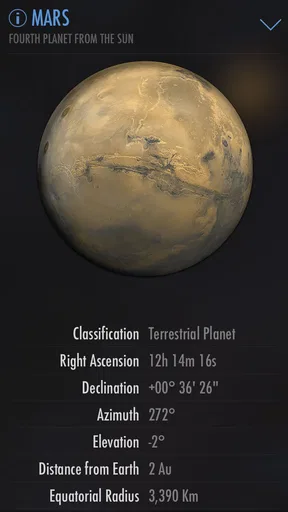
Tapping a celestial object for more information is another sensible bridge between recognition and learning. It lets a curious user follow up without leaving the activity to search elsewhere. The facts make the experience more than a moving map, though they are best approached one object at a time. If you try to absorb every label and detail in a single session, the sky can quickly feel like a screen full of information instead of something to enjoy.
Where it fits among astronomy tools
Compared with a printed star chart, the phone-based view is more immediate: you do not have to rotate a paper map and work out which direction matches your position before you can begin. Compared with a general web search, it keeps the object and its identification together in the moment you notice it. That convenience is the reason I would reach for it during an informal evening outside, especially when I am with someone who wants an answer now rather than a lesson first.
A dedicated astronomy reference may be a better choice for someone who already knows the sky and wants to spend time studying technical details. A basic chart can also be preferable if you want to keep screens out of a dark observing session altogether. SkyView’s strength is not that it replaces every other resource; it lowers the barrier to getting started. With 500K+ installs and a 4.5 average, it has clearly found people who appreciate that accessible approach, but its value still depends on whether an interactive phone view is what you want outdoors.
Small habits that make a session better
For a relaxed first outing, I would pick one bright object and use the app to identify it, then see whether I can recognize it again without looking at the display. That turns a quick answer into a memory exercise. A second useful approach is to choose a constellation and trace its connecting lines before moving on; trying to name everything at once is less satisfying and makes it harder to retain what you have found.
The time control is worth using before an outing, too. If you have a particular evening in mind, check the view ahead of time so you arrive with a question to investigate rather than opening the app with no plan. This is especially handy when you are introducing a child or a friend to stargazing: one object to find gives the session a simple focus, while leaving room for questions to lead elsewhere.
What can interrupt the experience
Augmented reality depends on the phone being pointed in the direction you intend, so an overlay can feel confusing if your device is not aligned as expected. I would not assume that every label will land perfectly over the object you are trying to identify in every situation. When the display seems uncertain, pause, adjust your position and direction, and compare the view with the wider sky instead of trusting one screen position blindly.
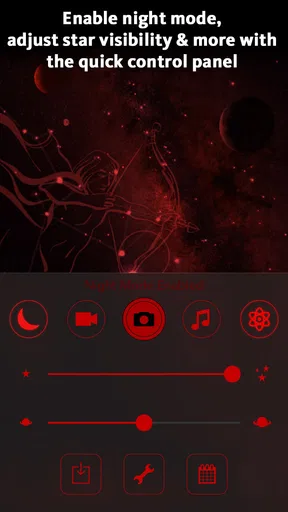
There is also a trade-off between convenience and dark adaptation. The red-light night mode is a thoughtful option for reducing the visual disruption of using a phone outside, but any screen use can still draw your attention away from the actual sky. I would keep checks brief and make use of the night mode when observing in darkness. If your priority is an uninterrupted, screen-free session, a printed chart or simply learning a few prominent stars may suit you better.
The app works without Wi-Fi, which is useful for remote outings where a connection is inconvenient. That does not mean the phone itself becomes irrelevant: you still need to handle and aim it, and its display remains part of the experience. I would open the app before walking away from a comfortable spot and make sure I am ready to use it, rather than letting setup distract from the moment I wanted to spend outside.
Who will enjoy it most
I would recommend it to a beginner who wants to identify what is overhead without first studying a map, and to a parent looking for a low-pressure way to start a conversation about space. It also suits casual observers who enjoy planning a small outing around a visible object, then checking what they actually found. The Everyone age rating reflects its approachable audience, while the educational details give curious users a reason to keep exploring beyond the initial novelty.
It is less suited to someone who expects a full astronomy course, a highly technical observing reference, or a completely screen-free tool. If you already identify objects confidently and want a more specialized study experience, this app’s accessible, visual approach may feel limited. Likewise, if you dislike using a phone outdoors at night, its central interaction will be a drawback rather than a convenience. Knowing that distinction helps set fair expectations before paying for it.
A realistic evening with the app
Imagine stepping outside after dinner because a bright point has caught your eye. Instead of guessing or heading indoors to search for it, you open the app, aim toward the point, and read the label. You tap it to learn a little more, then use the constellation lines to notice what else sits nearby. If you are with a child, that naturally becomes a small game: identify one object, find its neighbors, and see whether you can remember the pattern after putting the phone away.
That kind of ordinary moment is where I think the app earns its place. It does not require a dedicated astronomy night or a complicated plan. At the same time, it is not magic: weather, visibility, local surroundings, and your own ability to orient the phone all shape what you can make of the display. If the sky is hard to see, the app can still prompt questions, but it cannot make faint objects visible to your eyes.
What to expect before installing
The app has been available since September 27, 2014, and its current version is 3.9.2. It requires operating system version 10 or later. I would check that compatibility before buying, particularly if you keep an older device in service. At $4.99, it is a paid app rather than something to try at no cost, so the decision comes down to whether you expect to use its pointing-and-identifying approach more than once.
It has 1.3K reviews alongside its average rating, and I would read those as a sign that many people have spent time with it, not as a guarantee that every phone or every observing situation will feel identical. The app’s basic appeal is easy to understand, but the practical experience depends on how often you look up, how comfortable you are using a screen outside, and whether you prefer learning through visual prompts. For a curious beginner, those are reasonable trade-offs; for a specialist, they may be reasons to choose another tool.
A friendly guide, with a clear role
So, let me take you on a little journey with SkyView® Explore the Universe. Right off the bat, it’s super user-friendly. You just point your phone at the sky, and bam! You’re seeing stars, planets, and even satellites, all labeled and ready for exploration. It's like having a cheat sheet for the universe in your pocket.
One of the first things I noticed was the app's sleek interface. It’s intuitive and doesn’t bombard you with too many options, which is great because who wants to fiddle around with settings when you could be stargazing?
Features that Shine
Now, let’s talk features. The app uses your camera to overlay information about celestial objects directly onto your screen. It’s like augmented reality but for the universe. You’ll get to see constellations light up and connect the dots in real-time. Super satisfying if you ask me.
Another highlight is the time travel feature. You can literally jump to any date and time to see the sky as it looked then. Want to know what stars were shining on your birthday 10 years ago? You got it. Planning a romantic night out and want to know which constellations will be visible? Done and done.
Educational and Fun
Beyond just being a fun tool, SkyView is also educational. It’s packed with fascinating facts about all things celestial. You can tap on any object to learn more about it, which is a fantastic way to boost your astronomy knowledge without feeling like you’re back in school.
And here's a cool tidbit – the app doesn’t require Wi-Fi to work, making it perfect for those remote stargazing adventures. Just you, the stars, and your phone. No interruptions.
Perfect for All Ages
Whether you’re a seasoned stargazer or a curious newbie, this app has something for everyone. Kids will love the interactive aspects, and it’s a great way to get them interested in science. Adults will appreciate the detail and accuracy. It’s a win-win!
Plus, there’s a night mode with red light for those who want to preserve their night vision while using the app. It’s the little details like this that make it stand out.
Final Thoughts
In a nutshell, if you’re even remotely interested in astronomy, SkyView® Explore the Universe is a must-have. It’s informative, engaging, and just plain fun. It’s like having a universe explorer right in your pocket. Whether you’re identifying stars on a camping trip or just curious about what’s above your backyard, this app has you covered.
So, grab your phone, download the app, and start exploring the universe. Who knows what wonders you'll discover?
Verdict
Strengths of SkyView® Explore the Universe
- Intuitive interface for easy navigation.
- Augmented reality feature is immersive.
- Extensive database of celestial objects.
- Offline mode available for remote areas.
- Regular updates with new features.
Limitations of SkyView® Explore the Universe
- Limited free version features.
- Occasional AR tracking issues.
- Requires precise calibration.
- Battery consumption is high.
- No night mode for the interface.
Other Releases by Terminal Eleven LLC
View All
SkyView® Lite
Education4.3
Similar Picks in This Category
View All
Duolingo: Language Lessons
Duolingo4.7

Google Classroom
Google LLC2.8

Unacademy: Learn & Crack Exams
Unacademy3.2

Bible App for Kids
Life.Church4.4

Cake - Learn English & Korean
Cake Corp.4.7

Brainly: AI Homework Helper
Brainly4.5
Frequently Asked Questions
What is SkyView® Explore the Universe and how does it work?
SkyView® Explore the Universe is an augmented reality app that helps users identify stars, constellations, planets, and even satellites in the night sky. By simply pointing your device towards the heavens, the app overlays information on your screen, making astronomy accessible to both beginners and enthusiasts. It uses your location data to provide accurate celestial information.
Is SkyView® Explore the Universe suitable for beginners in astronomy?
Yes, SkyView® is designed to be user-friendly for beginners. It offers an intuitive interface with easy-to-understand visuals and descriptions. The app provides educational features like star and constellation identification, making it an excellent tool for those new to stargazing. It caters to all ages, including children interested in learning about the universe.
Does SkyView® require an internet connection to function?
SkyView® Explore the Universe does not require an internet connection for its primary functionality. The app uses your device's GPS to determine your location and display celestial objects. However, some features, like downloading additional data or updates, may need internet access. This makes it convenient for use in remote areas without connectivity.
What are the device compatibility requirements for SkyView®?
SkyView® is compatible with both iOS and Android devices. It requires iOS 12.0 or later for Apple devices, and Android 5.0 or higher for Android users. The app is optimized for smartphones and tablets, ensuring a smooth performance across different screen sizes. Ensure your device meets these requirements for optimal functionality.
Are there any additional costs or in-app purchases in SkyView®?
SkyView® offers a free version with basic features, but also includes a paid version, SkyView® Premium, which provides additional functionalities like more detailed star maps and enhanced customization options. In-app purchases may include extra features or ad removal. Users can decide based on their needs and budget.
